
Evaluating Prompts When Decimals Cost Thousands: From Chat Sessions to Synthetic Benchmarks
This morning I caught up with a friend to review an audit tool we are building on the side. The prompt helps finance teams inspect SaaS software licenses and calculate subscription savings.
We opened a sample run and spotted discrepancies right away. In the input file, nine dormant seats were clearly marked, but the model reported eight in its summary table. The savings formula was also double counting metrics across license tiers.
In financial forecasting, that kind of calculation mistake causes immediate problems. One wrong number or a misplaced decimal point can easily swing annual runway calculations by tens of thousands of euros. When executives see wrong numbers, they stop trusting the tool.
That discussion brought us straight to a familiar reality: the prompt looked fine during manual testing in a chat window.
The Chat Window Trap
Most teams test prompts inside a single long chat session. You paste a prompt with sample data. You check the reply. When the model makes a small mistake, you point out the error. Then you ask it to retry.
Steering the model like this takes time. It often feels like training a junior colleague who struggles with basic instructions, where you spend twice as long explaining the requirements as you would doing the job yourself. I recently examined why this endless back and forth drains engineering attention in From Prompt Tennis to Maturing Agents. After five or six messages, the output finally looks green.
That single session creates an illusion of reliability. The subtle nudges and corrections that guided the model stay trapped in that specific thread.
When you package that prompt into a reusable skill, that safety net disappears. The skill runs in a fresh session with no prior conversational context. A prompt that seemed reliable in an interactive chat suddenly drops a dormant seat because nobody is sitting there to steer it. Without automated feedback loops, like those covered in Closing the Feedback Loop: Reducing AI Agent Context Bloat Through Automated Self-Retrospectives, subtle errors compound silently.
One long session works for exploring an isolated scenario. Distributing a prompt as an automated skill demands a different standard.
The Bottleneck of Manual Verification
Once you realize single-turn prompts need systematic verification, the next move is building a benchmark suite with 100 to 500 test cases.
Manual verification slows you down immediately. Checking hundreds of test cases by hand in spreadsheets drains your energy. We build automations to give us our time back, whether that means going for a run or spending time in the garden. When testing forces you to spend an afternoon double-checking model arithmetic against raw numbers, you end up babysitting the machine.
If you ask a model to write the scenario and compute the answers, it hallucinates errors directly into the ground truth. You end up grading test runs against broken arithmetic.
We needed a testing flow that kept the numbers completely separate from the narrative context, applying the same segregation principles found in CQRS is the Secret Weapon for LLM Agents.
Decoupling Numbers from Narrative
Our solution splits the mathematics from the language generation into two distinct steps:
- A deterministic script generates the numbers and ground truth. Code computes the math, so churn rates and customer acquisition figures stay accurate.
- A language model generates the business story. The model takes those verified parameters and wraps them in realistic enterprise context, such as a scale-up auditing unit economics ahead of an investor review.
This separation gives you realistic edge cases without corrupted reference targets. You know the exact mathematical target before the model ever runs.
Keeping a Light Human Checkpoint on Mobile
You still want human eyes on new scenarios before they enter a permanent golden dataset. We routed scenario checks through an n8n workflow connected to mobile email notifications instead of reviewing bulk files at a desk.
When a scenario generates, the automation logs the row into Google Sheets and dispatches a review card to Gmail. From a phone, you can inspect the scenario text and confirm the target answer in five seconds.
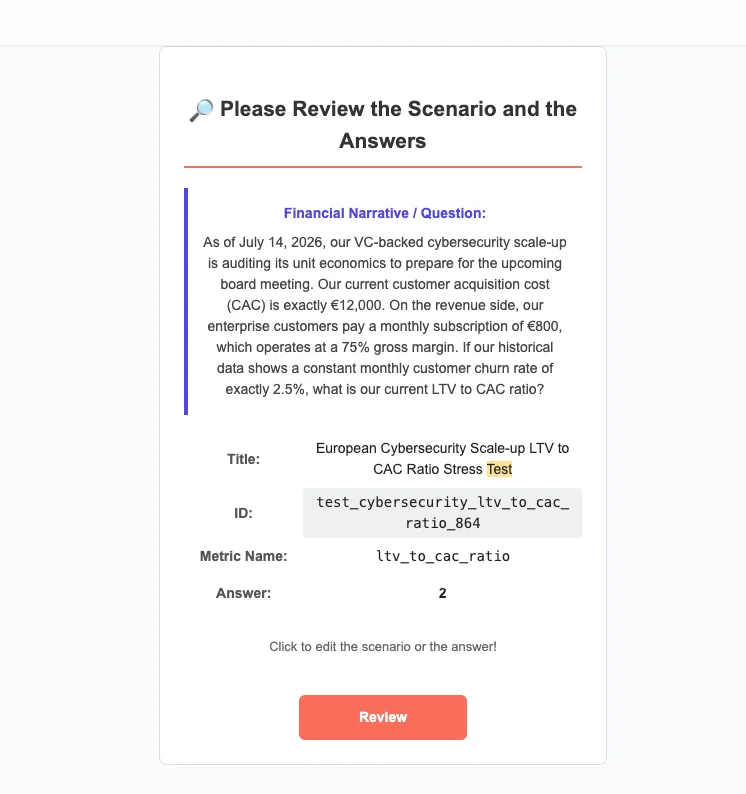
Once approved, the workflow runs the prompt against available models and measures latency. Results are written directly to Supabase.
Synthetic Benchmark Architecture
Continuous EvaluationDeterministic Math & Synthetic Narrative
Code generates verified numbers while an LLM drafts the business scenario. A mobile checkpoint confirms edge cases in seconds.
- Clean Invocations: Prompts run in isolated sessions without chat history bias.
- Enterprise Parity: Test strictly across models permitted by company policies.
- Cost and Latency Logs: Record token spend and response duration in Supabase.
- Context Extraction: Models parse unstructured customer files and text.
- Deterministic Offload: Arithmetic and seat counts hand off to scripts or MCP tools.
- Regression Retrospectives: Failed runs feed directly back into system guardrails.
When Four Models Miss the Target
Running systematic benchmarks quickly uncovers uncomfortable surprises about model behavior.
During one stress test on runway calculations for a Munich logistics company, our expected forward runway was 6.1 months. We ran that scenario through our evaluation pipeline across four Gemini models:
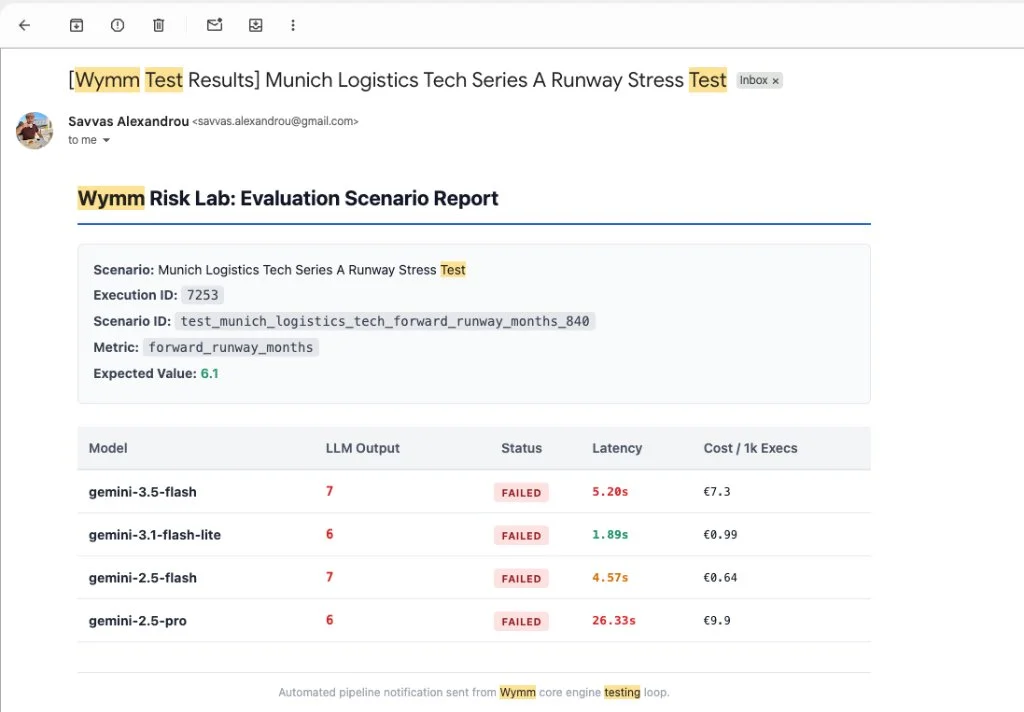
The results were clear:
gemini-3.5-flashpredicted 7 (FAILED)gemini-3.1-flash-litepredicted 6 (FAILED)gemini-2.5-flashpredicted 7 (FAILED)gemini-2.5-protook 26 seconds of processing time and still predicted 6 (FAILED)
All four models rounded the decimal to an integer. If you run that test once in an interactive chat, you might tell the model to include decimals and call it a day. In production, that discrepancy means a finance lead sees six months of runway instead of seven, shifting cash planning by hundreds of thousands of euros.
Enterprise Constraints Shape Your Test Matrix
My friend pointed out a practical constraint during our call: their company operates under strict IT policies where Gemini is authorized, but Claude and external APIs are completely blocked.
Public model leaderboards celebrate whatever foundation model claimed top rank this week. In enterprise production, those rankings mean little if security policies forbid the vendor.
When you build a skill or deploy an internal workflow, your test suite must benchmark against models your team can actually run. If your company runs on Gemini, your prompt versions must prove their reliability on those specific endpoints under isolated execution conditions.
The 90% to 99% Boundary: When to Stop Prompting
Pushing a prompt from 90% accuracy to 99% accuracy through longer system prompts and chain-of-thought rules hits diminishing returns.
The decision comes down to the operational cost of a mistake:
- Summarizing meeting notes allows for minor phrasing variations without breaking the workflow.
- Auditing financial metrics or forecasting runway means a single decimal error can misrepresent thousands of euros.
When precision matters, stop asking the language model to perform arithmetic in its token prediction loop. Let it extract parameters from uploaded files. Then pass those clean numbers to deterministic code or a Model Context Protocol tool for exact computation.
When an agent says something works and it does not, you encounter a false green. An automated evaluation pipeline gives you a clear retrospective to see where the prompt failed and adjust system guardrails so the mistake does not recur.
Further Reading
Wrestling with prompt reliability, model drift, or synthetic evaluations?
Let's grab a coffee and talk about moving beyond ad-hoc chat testing, building realistic benchmarks, and keeping agent outputs accurate.
Grab a CoffeeTransparency Disclosure: In compliance with transparency guidelines for AI-assisted content under EU policy, please note that this article was co-authored by Savvas Alexandrou and Gemini 3.8 Flash.